Product Tags
Product Tags
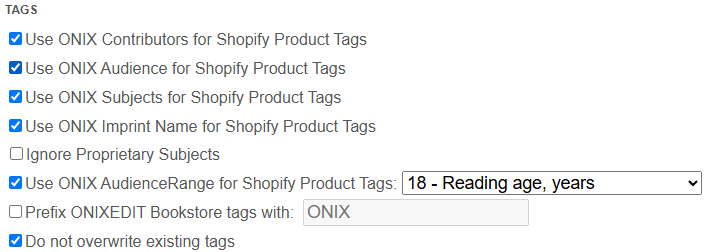
ONIXEDIT Bookstore enables you to automatically generate product tags in Shopify based on various ONIX composite values such as Contributors, Audience, Subjects, and Imprints.
If the Variant Grouping option is activated, ONIXEDIT Bookstore requires the creation of Contributor tags to properly group product variants. In this case, the corresponding option will be automatically selected and disabled (greyed out) to ensure consistency:

ONIXEDIT Bookstore can automatically create Shopify tags based on the AudienceRange composite in your ONIX metadata. For example, you might want to generate a tag that reflects the interest age (minimum and maximum in years) for each book. The ONIX metadata would include values like these:
<AudienceRange>
<AudienceRangeQualifier>17</AudienceRangeQualifier>
<AudienceRangePrecision>03</AudienceRangePrecision>
<AudienceRangeValue>8</AudienceRangeValue>
<AudienceRangePrecision>04</AudienceRangePrecision>
<AudienceRangeValue>12</AudienceRangeValue>
</AudienceRange>
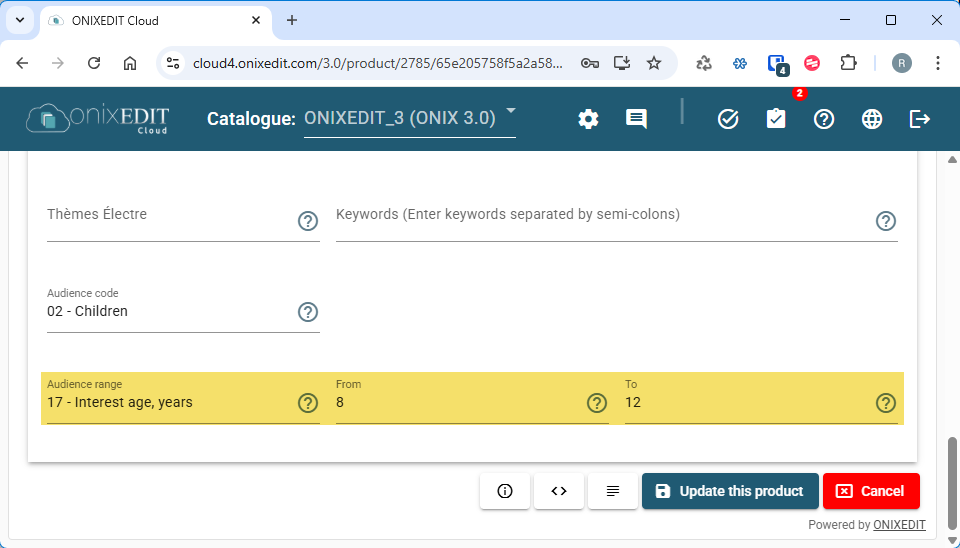
If you’re using a reliable ONIX creation tool like ONIXEDIT Cloud, you’ll benefit from a user-friendly interface to enter those age ranges without needing to manually handle XML:
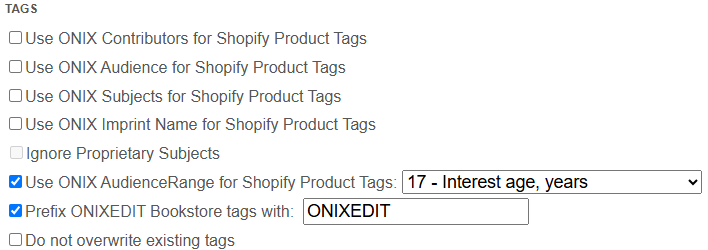
Want your generated tags to start with a specific prefix—like ONIXEDIT? You can set that up easily in the Tags Options of ONIXEDIT Bookstore:
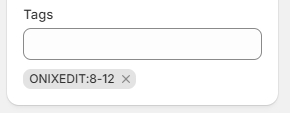
Once you import your ONIX file, the system will generate tags such as:
Created with the Personal Edition of HelpNDoc: Free help authoring tool